
What you get
- A desktop chart app for Windows or Mac with the indicators and time frames you use
- Live prices and candles stored in your own database
- Order controls (add to a position, exit) connected to your exchange account
- Lists of coins or stocks that match your screener rules, opened straight into the chart
- Installation on your own machines, with your keys kept private
Examples for your business
Day trader
A chart with your indicators on several time frames and a quick exit button.
Algo trader
A chart that shows the bot's entries, targets and profit/loss.
Advisory team
Screener lists that open straight into the chart during client calls.
Researcher
Back-test trades drawn on the chart to review your rules.
Your strategy, our auto-trading app
Tell us your trading rules and we turn them into an app that trades by itself. You keep the strategy; we build the software.
- You explain the rules: when to enter, when to exit and how much to risk. We write them down with you in plain language.
- We test them on history: a back-test on past candles with a clear report, before any real money is used.
- We build the auto-trading app: signals, order placement, position and risk limits, and a full log of every signal and order.
- It runs on your machine with your own exchange keys. Today we have built this for Binance futures; other exchanges can be added as new work.
- Your strategy stays private. We do not give trading advice or promise profits; trading carries risk.
Complete automatic trading system
One system, from market data to order and audit log, built around your strategy and running on its own.
- 1. Market data: live prices and candles collected from the exchange and stored in your own database.
- 2. Signals: your rules checked on many symbols and time frames at the same time.
- 3. Entries and exits: automatic entries, profit-booking exits, and limits on positions and time frames.
- 4. Risk control: position caps and the market-condition filters you choose.
- 5. Order handling: orders and positions across several exchange accounts, through the exchange API.
- 6. Monitoring and control: a chart and dashboard, several copies of the app that report in with heartbeats, and remote start and stop.
- 7. Audit log: every signal and every order recorded.
- 8. Back-testing first: your rules tested on past data before any real money is used.
24×7 reliability and backup (built to order)
Automatic trading only pays off while it keeps running. Around your trading system we can build the safety net below as part of a project. Typical effort is shown; we confirm it after we see your setup.
- Standby machine or VPS with a ready copy of the app: 2–3 days, plus hosting.
- Watchdog that restarts the app after a crash or a reboot: 2–4 days.
- Scheduled database backup every day to another machine or to the cloud, with a retention rule: 1–2 days.
- Automatic restore test every month with a report: about 2 days.
- Health dashboard with heartbeats, last order, open positions and data delay: 3–5 days.
- Phone alerts (for example a Telegram bot) when a copy stops, on errors or on a large loss: 1–2 days.
- Protective stop-loss orders on the exchange for every position: 3–5 days, and it needs your strategy sign-off.
- Automatic take-over by a standby copy: 1–2 weeks, built carefully so that double orders cannot happen.
What runs in our own setup today
- Several copies of the app on separate machines, sharing one database.
- A heartbeat from every copy, and remote start and stop of a copy or a group.
- Take-profit orders kept on the exchange, and limits on positions, time frames and accounts.
- We tell you plainly what is automatic and what is manual. We do not promise zero downtime.
What a charting app can include
- Candlestick charts with live price and several time frames, including time frames made from smaller ones.
- Indicators such as Bollinger Bands, EMA, DEMA and Heikin-Ashi, drawn as colour-coded overlays with a help tooltip for each.
- Multi-time-frame views: switch the key interval and step between intervals.
- Screener lists: tabs of coins or stocks that match your rules, such as Top 20 lists, opened straight into the chart.
- Trade marks on the chart: entry marks, target lines and profit/loss labels.
- Order buttons on the chart: add to a position or exit all, sent through your order manager.
- Back-test trades drawn on the chart, so you can see where your rules would have traded.
- Sharp on every screen, including 4K displays.
Screenshots from our own charting app
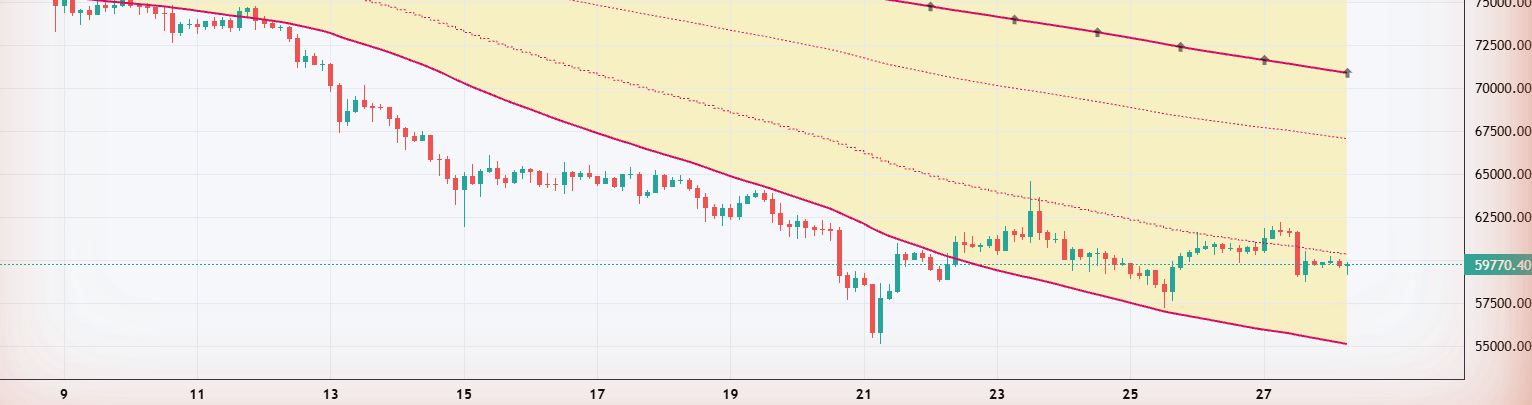
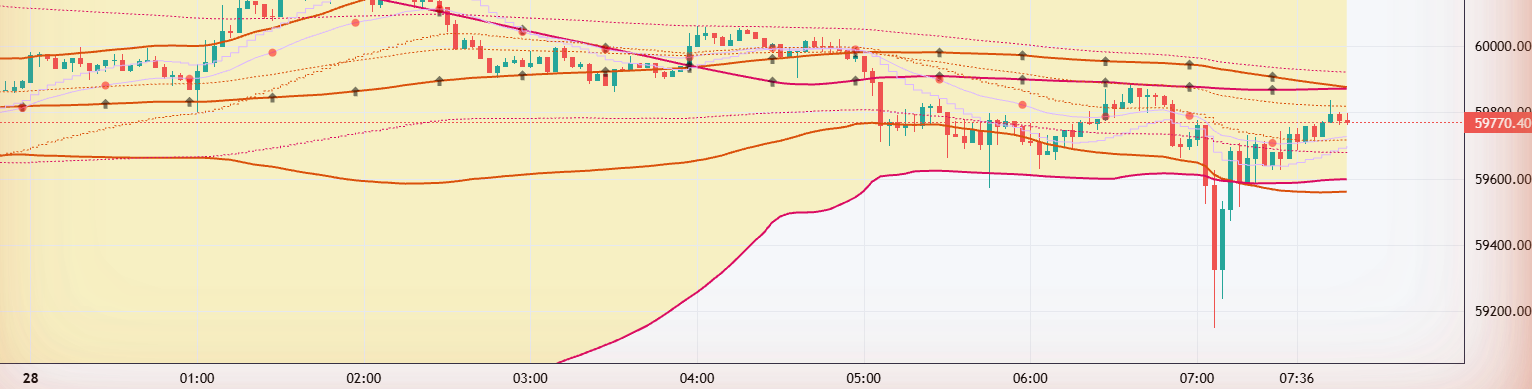
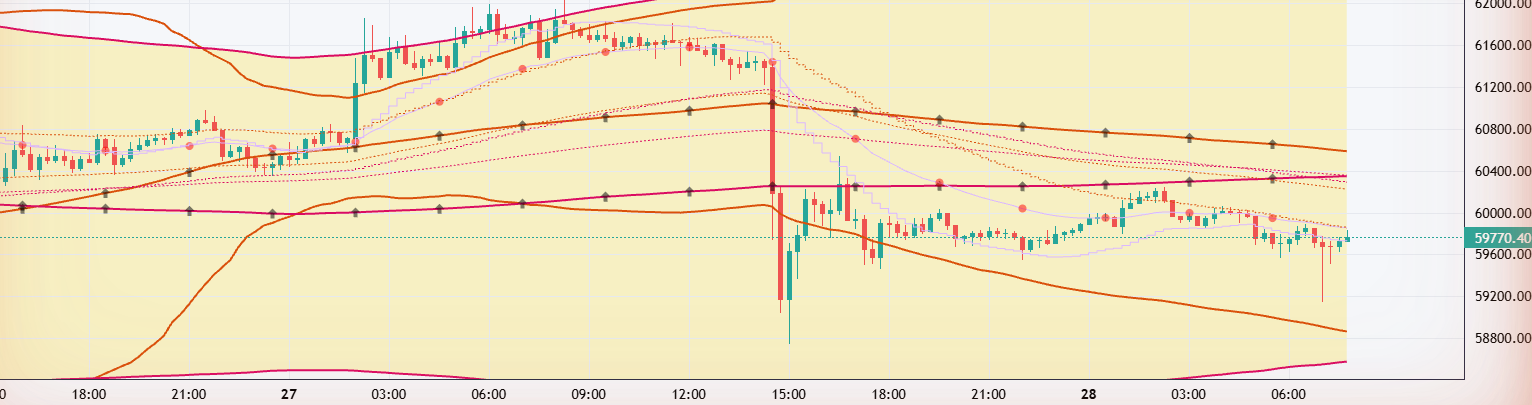

Screenshots show public market data (BTCUSDT) only. The layout and indicators are set up to each client's needs.
Building blocks we can supply
Typical effort for a clean client version. We confirm the time after we discuss your requirements.
- Chart component (desktop, candles, indicators, several time frames): about 2–3 weeks.
- Indicator engine (Bollinger, EMA, DEMA, Heikin-Ashi, resampling): 1–2 weeks.
- Screener rule engine (many symbols, many time frames, stage rules): 3–4 weeks.
- Binance futures connector (orders, positions, several accounts, rate limits): 2–3 weeks.
- Order and position manager with exits and limits: 2–3 weeks.
- Back-tester and report: 3–4 weeks.
- Live-price and candle-sync services (Redis and SQL Server): 1–2 weeks.
- Trade-on-chart actions (add, exit) through the order manager: about 1 week.
Built to order (new work)
These are not ready-made today. We can build them for you as part of a project:
- Drawing tools such as trend lines.
- Dragging stop-loss and target lines to change orders from the chart.
- A web version of the chart.
- Other exchanges and Indian brokers.
- Telegram, email or SMS alerts.
How we work
- 1. Tell us the chart and trading flow you need.
- 2. We write it down: your rules and screens, and agree the list with you.
- 3. We build in steps, with a working version early.
- 4. We test on real market data before release.
- 5. We install it on your machines; your keys stay with you.
Technology
- C# .NET and Avalonia for the desktop app.
- The open-source Lightweight Charts library (by TradingView) for fast chart drawing.
- SQL Server and Redis for data, Python for research.
Your strategy stays yours
- We build to your rules and keep them private – they are never published, shown to other clients or reused.
Frequently asked questions
Do you guarantee 24×7 uptime or zero downtime?
No. We design for continuous running with backup, restart and alerts, but exchanges, networks and power can fail, so we cannot promise zero downtime. We tell you plainly what is automatic and what is manual.
Can I give you my strategy and get an auto-trading app?
Yes. You tell us your rules and we turn them into an app that places orders by itself. We back-test it first and add risk limits. We build to your rules; we do not give advice or promise profits.
Can the chart be a website instead of a desktop app?
Our own charting app runs on Windows and Mac. A web version is possible as new work; tell us what you need and we will estimate it.
Which exchanges and data sources do you connect to?
Binance futures is built and running with us. Other exchanges and Indian brokers can be added as new work.
Do you give trading advice or promise profits?
No. We build software to your rules; we do not provide investment advice and cannot promise profits. Trading carries risk.